Sign-in, calls and the paperwork behind them.
Try the visitor check-in yourself → No sign-up. Nothing is saved.
For your business, and the rest of your week · No app to install · Set up with you · Cancel any time
Each has a distinct job. Together they are a digital front office: a visitor, a caller and a contact in the same shared list, rather than reception reconciling three records by hand.
A visitor checks in on a tablet by answering your own questions. The people who should know are told by email or SMS within seconds, and reception can see everyone who is in the building.
Give it your number, opening hours, greeting and the information it should know. It answers callers, takes messages and emails a summary of what each caller wanted.
It reads and writes documents, works with spreadsheets and figures, handles receipts and bookkeeping, keeps a thread across a task and can act later on a schedule. It connects only to the mail, calendar, Drive and repositories you choose.
Three minutes, on the real product: a visitor signs themselves in on your tablet, the person they came to see is told, and reception sees everyone in the building.
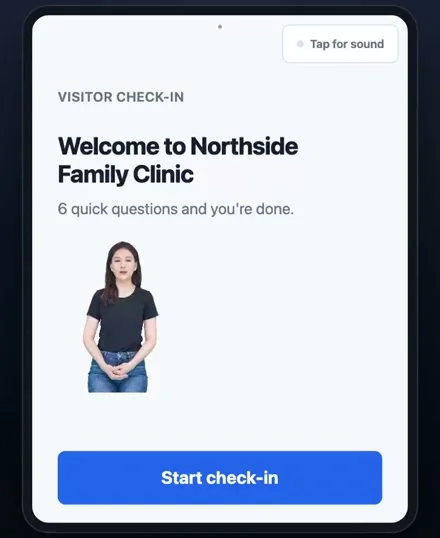
One question at a time, in large type, on your own tablet. The questions are yours, and the confirmation shows a badge number rather than a name, because a waiting room can read over somebody’s shoulder.
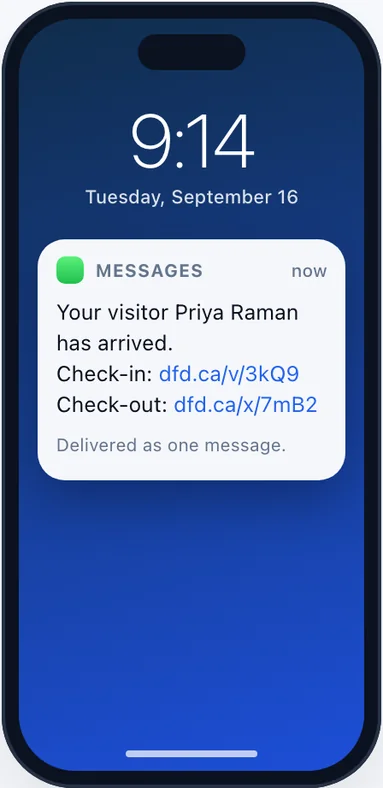
Whoever the visitor came to see gets a text or an email, their choice, with two short links: one to say I’ll take this, and one to close the visit when it is over. Neither needs a login.
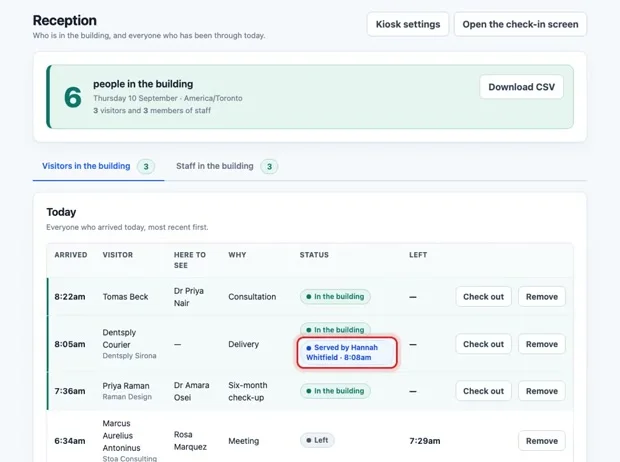
One page and one count, staff included, because the number a fire warden needs is everybody rather than everybody with a badge. Check anyone out with one button, or download the day.
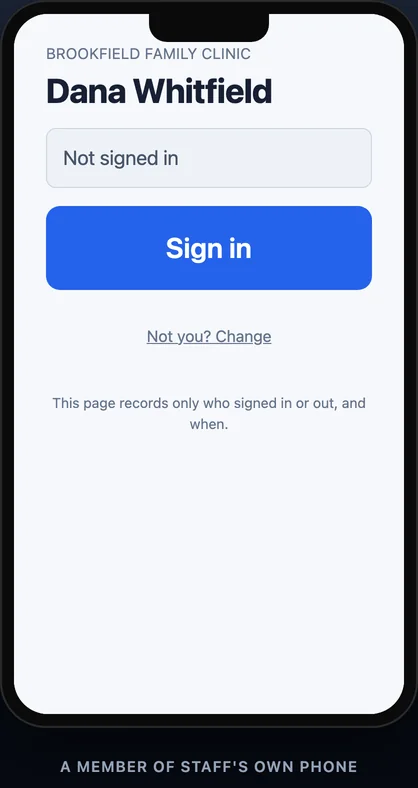
A poster by the staff entrance carries a QR code. Somebody scans it with their own phone, picks their name once, and from then on one tap counts them as in the building.
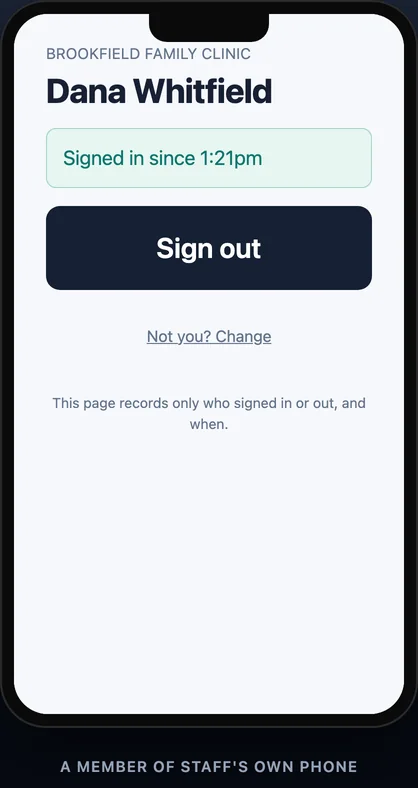
On the way out, the same page shows how long they have been in and the one button that closes it. Anyone still signed in overnight is closed automatically, so the morning starts at zero.
It answers with your greeting, knows your opening hours and the things you have told it, takes a message and works out what the caller actually wanted. Then it emails you the summary, so the call that came in while the desk was busy is still a thing you can act on.
Callers who are trying to reach you become contacts in the same list as the people who walk through your door. Spam is marked as spam rather than forwarded, and a call that needs chasing is flagged as one.
Recording is yours to switch on or leave off. When it is off, no recording link is made and none is sent.
Asked to move Thursday’s two o’clock appointment to the following week. Said either morning would suit. Left a mobile number to confirm on.
It depends on what you need and how busy your practice is. Tick what interests you and we will send you a price for your practice, usually the same day.
The third assistant is not a front-of-house one. It works on a private machine for your business alone: give it a job, a file or a receipt, and it carries the work through to something you can use — for your business and the rest of your week.
PDFs for reports, invoices, quotes and letters. Word documents, Excel spreadsheets and PowerPoint slides.
It works from your figures, makes charts and graphs, and keeps the thread so a task can continue. It can act later, on a schedule.
Give it a receipt and it records it in your double-entry books. It organises the records; it does not replace your accountant.
For invoices, proposals and flyers that need considered layout it renders HTML and CSS to PDF, and it renders Persian, Arabic and other non-Latin text in the files it makes, so a document does not come back with the language missing. It connects only to the mail, calendar, Drive and repositories you choose, and with a connected repository it can propose a change for review but cannot push to your branches.
Five of the organisations running Moneli assistants today — a clinic across reception and the phone, a coordinator on calls alone, a family court clinic on visitor check-in, a network services company on scheduling, and a financial practice on intake in its clients' languages.
 Joelene Bamford
Executive Director, London Family Court Clinic
Joelene Bamford
Executive Director, London Family Court Clinic
Our experience with Digital Front Desk has been exceptional, from the ease of implementing the system to the outstanding responsiveness and support we received throughout the process. We are especially pleased to partner with a Canadian company that genuinely took the time to understand our needs and provide a solution that works for our organization.
 Dr. William July
Licensed Clinical Psychologist
Dr. William July
Licensed Clinical Psychologist
The days of paper logbooks and missed calls are over. This system has completely transformed our reception area. The AI voice assistant handles calls when our staff is busy, taking messages and scheduling appointments. Walk-in visitors check themselves in using the touchscreen kiosk, and our team gets instant notifications. Everything is logged digitally — calls, visitors, appointments — all searchable and secure. It’s like having a 24/7 digital receptionist that never takes a break.
 Carmen Harris
Independent Insurance Coordinator
Carmen Harris
Independent Insurance Coordinator
Carla makes it easy to leave a message and truly feels like speaking with a person. The process is smooth and welcoming, which is important for our mental-health clients. I also appreciate that Carla handles many routine caller questions and provides accurate information right away. This gives our staff more time to focus on patient care instead of managing phone calls.
 Gary Kenning
Managed ISP & Network Services
Gary Kenning
Managed ISP & Network Services
The automation solution has allowed us to scale our operations without proportionally increasing our administrative overhead.
 Maral Aineh Beigi
Financial Advisory Practice
Maral Aineh Beigi
Financial Advisory Practice
The multi-lingual Digital Front Desk has transformed how I connect with clients from diverse backgrounds. I can now serve clients in their preferred language while automating my entire intake process.
 London Family Court Clinic
Announcement on LinkedIn · September 16, 2026
London Family Court Clinic
Announcement on LinkedIn · September 16, 2026
Read the post on LinkedInWe are pleased to introduce a new way to welcome clients and visitors to our office!
Our new digital visitor assistant makes checking-in quick and simple. When you arrive, the virtual assistant will ask two simple questions let your appointment provider know you’re here.
We’re excited to modernize our reception process while continuing to make sure clients and visitors feel welcomed and know what to expect when they arrive.
We’re grateful to offer this new service in partnership with Digital Front Desk by Moneli Automation, a Canadian company, who have been incredibly supportive and responsive throughout the process!
You write the questions visitors see, enrol a tablet with a one-time setup code, set your opening hours and choose what is kept afterwards and for how long. Voice and Autopilot are set up with you too, including only the connections you choose to make.
The lobby screen is a web page, not an app to install. Reading the questions aloud, the on-screen presenter, photographs, ID capture and AI follow-up questions all exist and are all switched off until you ask for them.
 Digital Front Desk