Digital Front Desk Try it free
Appointment reminders · Canada

Appointment reminders that go out on their own, and a list of who is due to come back

Every booked client gets a reminder the day before, by email and, from your practice's own number, by text. And your contacts keep track of when each client was last in and how often they come, so you can see who is due to rebook and send them a short text with one press.

No card to try it. Plans from $69 CAD a month.

Two jobs a front desk does by phone, done for you

Missed appointments and clients who quietly drift away cost a practice more than almost anything else. Both are fixed by the same thing: a short, polite message at the right moment.

The day before: an automatic reminder

  • Every confirmed appointment is reminded about 24 hours ahead, with nobody pressing anything.
  • By email to every client with an address, and by text too when your practice has its own Canadian number.
  • Sent only between 9am and 8pm in your own time zone, so an 8am appointment is reminded at 9am the day before.
  • Every message has a way to stop reminders. Untick one appointment, or switch reminders off for the whole practice.
  • Clients can answer with one tap, Yes, I will be there or I need to change this, and the appointments page shows who has answered. Switched on per practice.

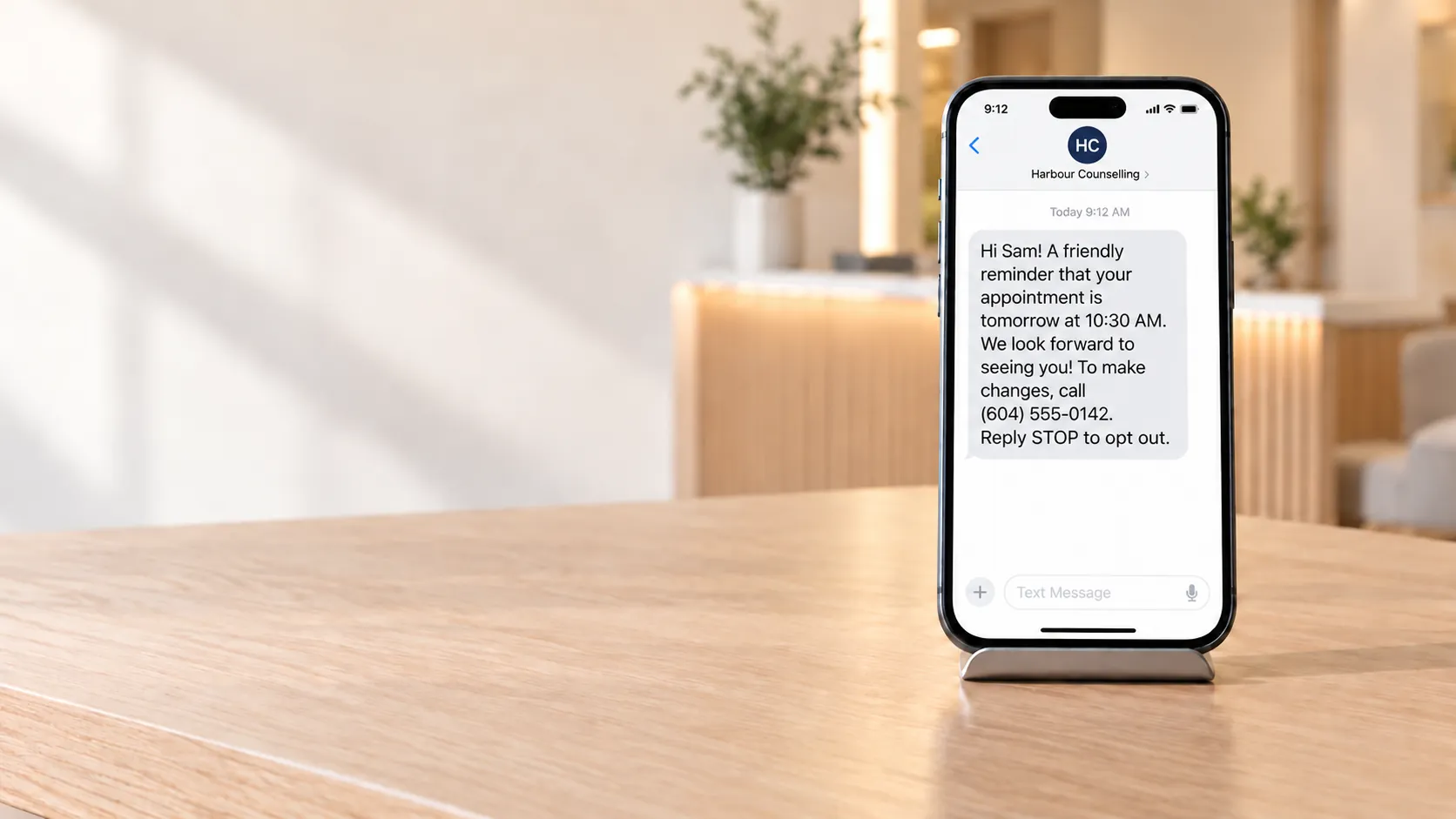
The text a client receives

Harbour Counselling: reminder of your appointment Friday 3 October at 10:30 AM. To change it, call (604) 555-0142. Reply STOP to opt out.

Due to come back: rebooking you can see

  • Set how often each client comes (every 3, 6 or 12 months, or whatever suits them).
  • Marking an appointment as attended moves their next due date by itself.
  • Due for a visit lists who is due now and who is due in the next month, with a count beside it in your contacts.
  • Tick the clients to contact, preview the texts, and send. You press send, up to 25 at a time, and the preview shows anyone who will be skipped and why.
  • Clients who already have an appointment booked are skipped, and so is anyone who replied STOP, even before they were in your contacts. Sending stops at 8pm your time, even partway through.

The text a client receives

Hi Sam, it's Harbour Counselling. You're due for a visit (every 6 months). Call us or book: https://digitalfrontdesk.ca/l/Xk3p9Qa2 Reply STOP to opt out.

How it works

  1. Add your clients

    Type them in or import a spreadsheet. A client's email address is enough for day-before reminders.

  2. Book appointments

    Set your time zone once, and every confirmed appointment is reminded the day before.

  3. Mark each visit as attended

    That is what moves the client's next due date, so the list stays true without anyone keeping it by hand.

  4. Once a week, open Due for a visit

    Preview the rebooking texts, check who is skipped, and send. Or pick up the phone: the list is useful either way.

Or just ask the Guide

Signed in, type what you want into the Guide in the corner of any page. Switched on per practice.

Book or draft by asking

"Book Sam for a checkup on Tuesday at 10." "Draft an invoice for Priya, cleaning, $120." The Guide shows exactly what it will create, and nothing happens until you press confirm. One at a time: quotes and invoices only as drafts, an appointment booked like any other, with its usual reminder. It never cancels, moves or deletes anything.

Ask what is going on

"Who has unpaid invoices?" "What is on today?" The answer comes from your own records and is drawn by the software. Only your words go to the AI, never your client records.

Careful with your clients' privacy

No clinical detail in any message

A reminder says who it is from and when. A rebooking text says a client is due for a visit, never why. Messages are read on lock screens, in front of whoever is standing there.

Stored in Canada

Your client records are stored in Canada, and processed in Canada and the United States. Reminder emails are sent through Zoho Mail in Canada; texts are carried by Twilio in the United States. The full list is on our subprocessors page.

Built around CASL

Every text names your practice and ends with "Reply STOP to opt out", and a STOP reply is honoured by the software, not only by the phone carrier. A rebooking text goes only to a client who has consent on file, or whose last visit was within two years. Nobody is texted about rebooking more than once in 30 days.

Consent is still yours to hold and to record: the software checks the rules it can see, and it is not legal advice.

Questions practices ask

Do appointment reminders go out automatically?

Yes. Every confirmed appointment is reminded about 24 hours ahead, between 9am and 8pm in your time zone, with nobody pressing anything. You can untick a single appointment or switch reminders off for the whole practice.

Do rebooking texts go out automatically too?

No, on purpose. The Due for a visit list shows who is due, and a person chooses who to text, sees every message first, and presses send. It sends up to 25 at a time, so one click is never a blast to your whole list.

Can clients confirm their appointment?

Yes, where it is switched on for your practice. The reminder carries a link that works once, for that appointment only. The client taps Yes, I will be there, or I need to change this, and the appointments page shows the answer. Nothing is moved until your front desk acts on it.

Can I book an appointment or draft an invoice just by asking?

Yes, where the Guide's actions are switched on. Ask in plain words, check the card it shows, and press confirm. It creates one appointment or one draft at a time. A booked appointment gets your usual reminder, unless you untick it on the card; a quote or invoice stays a draft, so it still leaves only when you send it.

Do I need a phone number to send texts?

Texts go from your practice's own Canadian number, which we set up with you, and only to Canadian mobile numbers. Email reminders need no number at all: they start as soon as your time zone is set.

Is this patient recall software?

It does the job recall software does for a clinic, and a service reminder does for a trade: it knows when each client was last seen and how often they come, and shows who is due. We call it "due for a visit" because the same list works for a counsellor, a physiotherapist or a furnace service.

What do the messages say about my clients?

Nothing clinical. A reminder names your practice and the time; a rebooking text says the client is due for a visit. The reason for a visit is never in a message, and it cannot be added.

Where is client information stored?

Stored in Canada, and processed in Canada and the United States. Email goes through Zoho Mail in Canada and texts through Twilio in the United States. Our privacy policy sets out the detail.

Can a client stop the reminders?

Yes. Every email has a stop link and every text ends with "Reply STOP to opt out". Once a client stops them, the software does not message them again.

How much does it cost?

Reminders and the due list come with every Digital Front Desk account, alongside visitor check-in, contacts, quotes and intake forms. Plans start at $69 CAD a month, and you can try it free with no card.

Try it with your own appointments

Make an account in two minutes, add a client and book them in. The reminder goes out the day before.